Click
 HERE
HERE to Return to Main Help Page!
This page updated: 15 May 2024
Click

 Home
Home
| If you have Windows XP installed and are having trouble getting the Microsoft Comic Chat Character Editor to work properly, you are NOT alone!
This page is written to resolve issues that arise between the
If you already have the Comic Chat Character Editor
Microsoft has provided a small application tool on the Windows XP installation
In order for the installation of the 'Comic Chat Character Editor' to be successful,
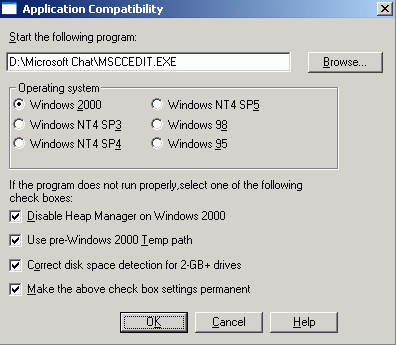
LQQK ! Then one MUST use the 'Application Compatibility' tool to not only install
For those who didnt get a WinXP disk with their computer, the APCOMPAT.exe program is also (The following graphics were setup and screen captured by KellieZ:)
2. Then use the browse button in the 'APCOMPAT' screen to find the 'Character Editor' installation file stored on your computer. 3. Then look at the graphic below and set it up by checking the boxes you see checked in the graphic.
4. Click 'OK' and let the program install the 'Character Editor'.
Once the 'Character Editor' is installed, One must reboot! If this rule is not followed, you have to uninstall the Character Editor
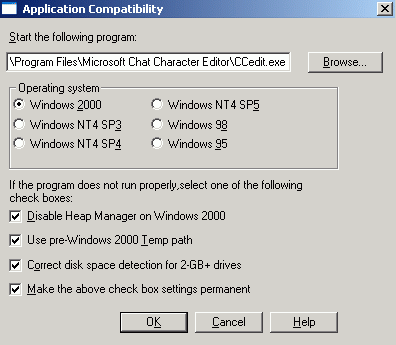
This time one browses to the actual 'Character Editor' program file 'CCEDIT.EXE'.
This will actually start the Character Editor and make it run as if You are finished and ready to 'Rock and Roll'! Explanations and Instructions are located within this Zipped download file.
|